How to enable 2FA(TOTP) auth
In the Community Edition, two-factor authentication via TOTP (Google Authenticator) is available.
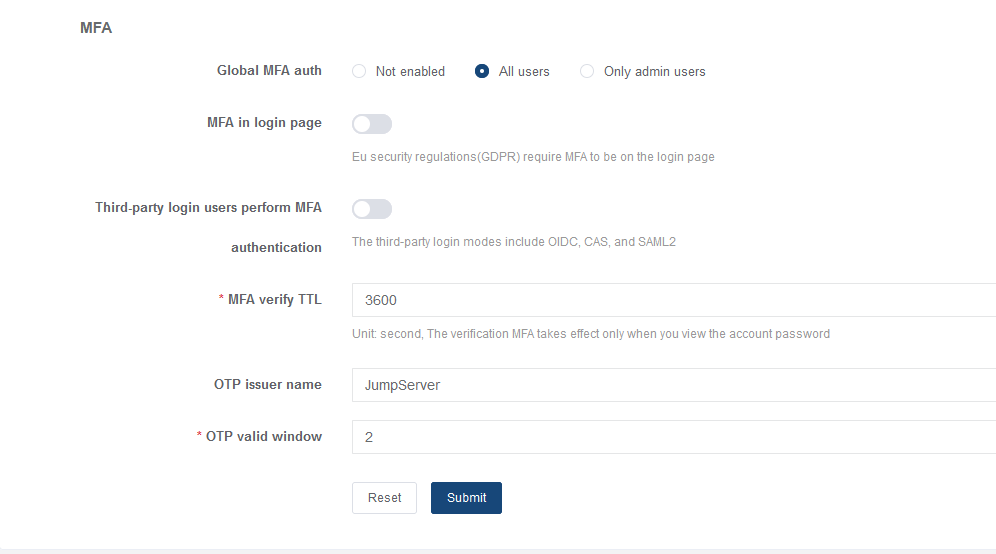
To enable it, go to System setting - Security - Auth
Security. The Global MFA auth parameter
allows you to disable two-factor authentication or enable it for
all users or only for administrators.
Note: For TOTP to work correctly,
the JumpServer server must configure the NTP service to obtain the
correct time.
In JumpServer Enterprise, other two-factor
authentication options are also available, such as two-factor
authentication via RADIUS.
| << Active Directory synchronization with AD groups | Installing OpenSSH for account management for Windows >> |
Stuck? If you are running a pilot, write to support@afi-d.com or in your project's Telegram group. Community Edition users can buy a support subscription: see Technical support. Video guides are on our YouTube channel.