RemoteApp configuration for application publishing
Note: The Community Edition supports only the HTTP application publishing mode.
RemoteApp is the publication of applications on
Microsoft RDS. To use it, you need a Windows Server with configured
RDS (RemoteApp). JumpServer can connect to
applications published on the RDS server and authorize in them.
This is mainly relevant for database management and web interface
applications.
To support RemoteApp, you need to configure JumpServer and the RDS
server.
Requirements:
- MS Windows Server 2016 or MS Windows Server 2019
- Installed RDS (Remote Desktop Services) role
- Installed OpenSSH ( you can install in from https://JS_IP/core/download/ )
Adding a Publishing Server to
JumpServer
Go to "System settings - RemoteApp", select the "RemoteApp machine" tab, and click "Create".

Parameter Descriptions:
| Parameter | Description |
|---|---|
| Name | Device name |
| IP/Host | IP address or network name of the RDS server |
| Protocol | Protocols and port numbers. Specify WinRM or SSH if OpenSSH will be used |
| Accounts | An administrator account for accessing the RDS server |
| Auto create accounts | Enable automatic account creation for connecting to published applications |
| Accounts create amount | Number of accounts to be created |
| Core service address | The communication address between the agent of the remote application publishing machine and JumpServer backend. Replace http:127.0.0.1 with your server's IP address |
| RDS license | Configure the RDS license server |
| RDS License Server | RDS license server parameters |
| RDS authorization mode | Choose "Device" or "User" to configure the authorization mode. |
| RDS single user single session | Choose "Disable" or "Enable" to configure the single session mode for one user. |
| RDS maximum disconnect time | When the session reaches this maximum time, the connection is terminated. |
| RDS remote application logout time limit | Time to log out after the remote application session is disconnected. |
Click "Submit" to save the settings.
Setting Up the Application Publishing Mechanism
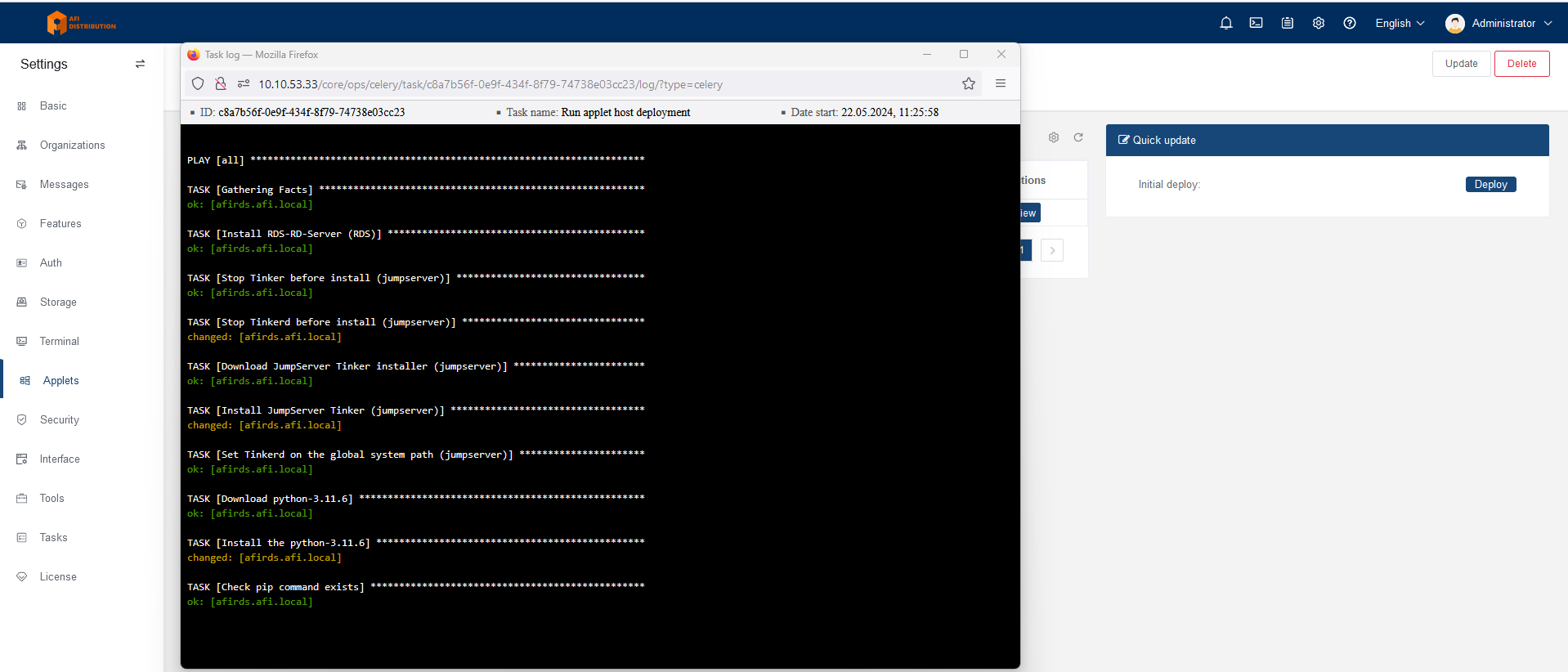
Click on the name of the added publishing server. Server information will open; go to the "Deploy RemoteApp machine" tab and click the "Deploy" button on the right side of the screen.
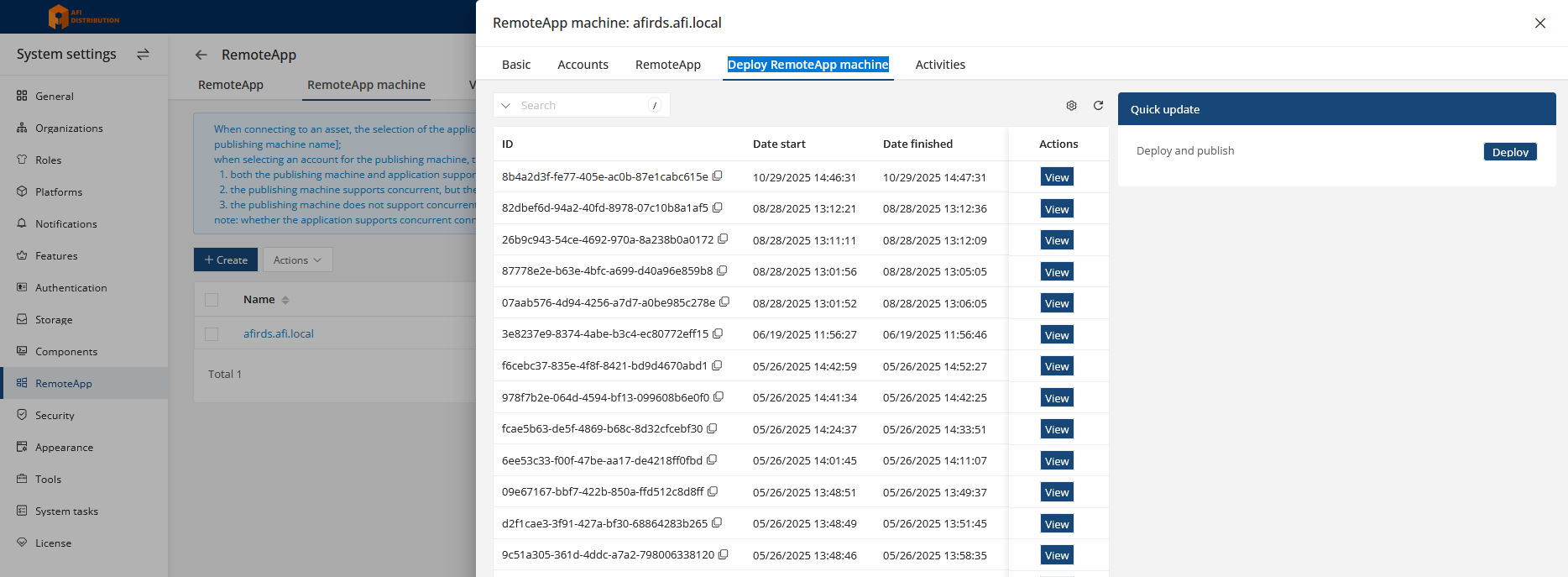
An installation window will appear, showing the installation process:
Application Publishing
You do not need to manually install applications on the RDS server; JumpServer provides ready-made applets that will automatically install and publish the required applications. Existing applets are available on the online portal, where you can download them.
To publish an application, open "System settings - RemoteApp and go to RemoteApp machine tab. Here you can see the list of added applets, their status, and the "Deploy" and "Uninstall" buttons for installing and removing applets from the publishing server.
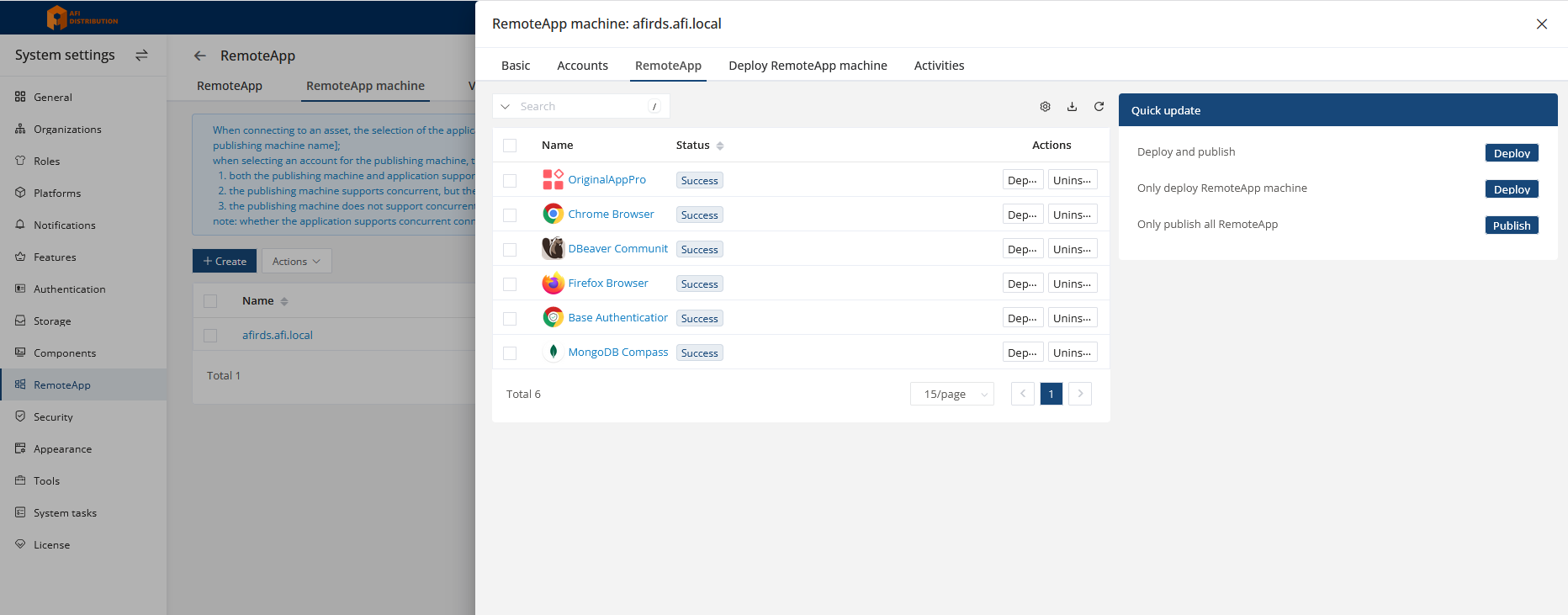
If the applet status is "Success", you can add devices and connect to them using the corresponding applications. For connecting to web interfaces (HTTP), you can use the Chrome or Firefox applets.
| << Installing OpenSSH for account management for Windows | Setting up Panda for application publishing(alternative to RemoteApp) >> |
Need help?
Support during the JumpServer PAM Enterprise Edition PoC
Have you started testing JumpServer PAM EE and encountered an issue? Our process includes organizing email threads or Telegram groups for prompt issue resolution. If you are sure you were not added to such a group, please contact your supplier or reach out to us at support@afi-d.com
Training for your specialists on configuring and administering JumpServer PAM
As part of an active technical support subscription, we will train your specialists in installation, configuration, administration of JumpServer PAM, as well as recovery from errors and incidents.
Training is conducted online, according to a pre-agreed plan, and includes mandatory practical knowledge verification with the issuance of personalized certificates (upon successful exam completion).
Video tutorials
Visit our channel on YouTube with video tutorials covering the configuration of all JumpServer PAM sections. The videos are updated with each new release.
Technical support for the free JumpServer PAM Community Edition
The idea of implementing a complex but business-critical PAM system can be intimidating due to the perceived complexity of setup, administrator and security team training, and changes to account management processes.
To make the deployment and configuration of JumpServer Community Edition comfortable, and to ensure you can always rely on professional assistance, AFI Distribution offers an annual technical support subscription.
The support package priced at 1.5 million RUB per JumpServer Community Edition instance (with no limits on the number of users or target systems) includes everything required to use PAM:
- documentation and instructions;
- usage scenarios and recommended deployment architectures;
- training for administrators and information security specialists on working with JumpServer;
- tips and solutions for common questions;
- notifications about new releases with verified upgrade instructions;
- integration with RADIUS and multi-factor authentication “Multifactor” ;
- direct access to an engineer (no first-line support) with a clear SLA.